

Your paycheck depends on a form most people rush through.
Most employees complete a W-4 during onboarding and move on. That quick decision controls how much tax your employer withholds from every paycheck.
That choice affects two outcomes:
- your take-home pay today
- your tax bill or refund later
If you want steady paychecks and no surprises at tax time, you need to know how to fill out a W-4 form correctly.
This guide walks through each step in plain language and shows how to adjust your W-4 for real-life situations.
What is a W-4 form?
A W-4 form is a document you give your employer to tell them how much federal income tax to withhold from your paycheck.
The goal is simple:
- avoid owing a large balance when you file
- avoid overpaying and shrinking your paycheck
You usually complete a W-4 when you:
- start a new job
- change jobs
- experience a life change (marriage, child, second job)
You can review the official details on the IRS Form W-4 overview and instructions.
Key Takeaways
- Your W-4 directly controls your paycheck and tax outcome. More withholding means a smaller paycheck and larger refund, while less withholding increases take-home pay but may lead to a tax bill.
- Accuracy matters more than speed when completing the form. Key steps include filing status, multiple jobs (Step 2), dependents (Step 3), and adjustments (Step 4)—skipping these can lead to underpayment.
- Multiple jobs and dual-income households require extra attention. Failing to complete Step 2 correctly is a common cause of owing taxes at year-end.
- The IRS estimator provides the most reliable results. It helps calculate proper withholding based on real income, credits, and deductions instead of guesswork.
- Review and update your W-4 after life changes. Marriage, children, new jobs, or side income all affect withholding—regular updates prevent surprises and keep your finances balanced.
Why your W-4 matters more than you think
Your W-4 controls the balance between your paycheck and your tax result.
- More withholding → smaller paycheck, larger refund
- Less withholding → larger paycheck, possible tax bill
There is no universal “best” setup. The right choice depends on your income, family situation, and goals.
If you guess or skip sections, you risk:
- owing money in April
- losing cash flow during the year
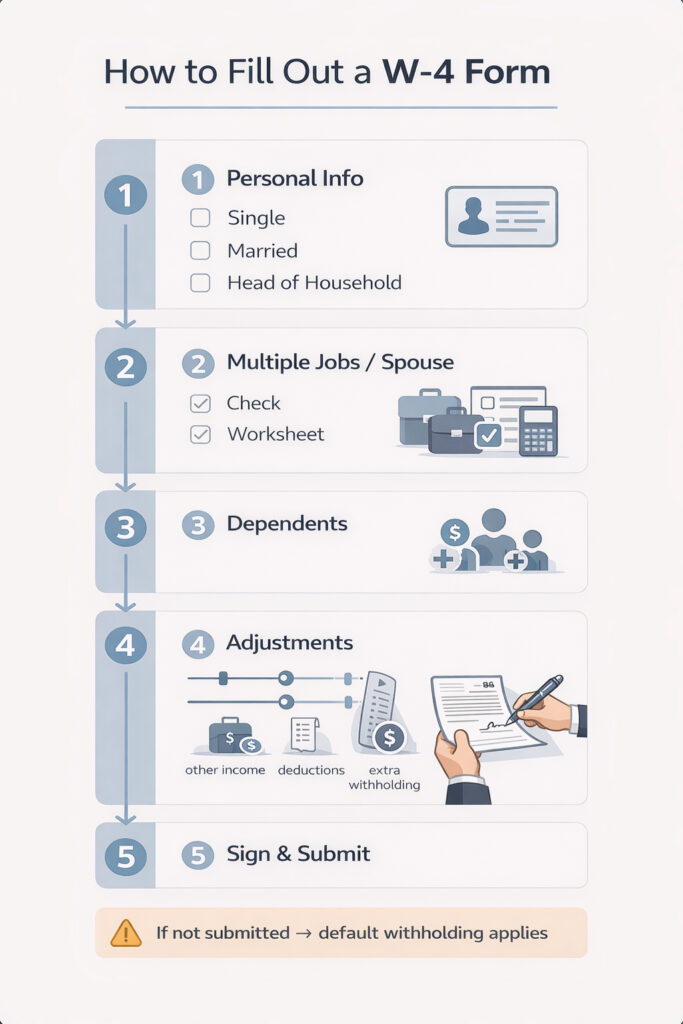
How to fill out a W-4 form
This is the core process every employee should understand.
Step 1: Enter your personal information
Start with basic details:
- name and address
- Social Security number
- filing status:
- Single
- Married filing jointly
- Head of household
Your filing status affects how much tax gets withheld.
Step 2: Account for multiple jobs or a working spouse
Complete this step if:
- you have more than one job
- your spouse also works
You have three options:
- check the box for two similar-paying jobs
- use the worksheet on the form
- use the IRS W-4 estimator tool for accuracy
If you skip this step, you may not withhold enough tax.
Step 3: Claim dependents
Enter credits for:
- children under 17
- other qualifying dependents
This step reduces how much tax your employer withholds, which increases your paycheck.
Important note: If both spouses claim dependents on separate W-4s, you may underpay taxes.
Step 4: Make optional adjustments
This step helps you fine-tune your withholding.
- 4(a): Other income (interest, side work)
- 4(b): Deductions (if you itemize)
- 4(c): Extra withholding per paycheck
Use this step if your tax situation is more complex or if you want tighter control.
Step 5: Sign and submit
Sign and date the form, then give it to your employer.
If you do not submit a W-4, your employer will apply a default withholding setup.
How to fill out a W-4 for common situations
Single employee with one job
- Complete Step 1 and Step 5
- Leave other sections blank if you have no dependents or extra income
Married couple with two incomes
- Complete Step 2 carefully
- Use the IRS estimator for best results
- Coordinate both W-4 forms to avoid errors
Employees with side income
- Use Step 4(a) or add extra withholding
- This helps cover tax on non-payroll income
Employees with children
- Use Step 3 to reflect tax credits
- This increases take-home pay but must be accurate
Use the IRS W-4 estimator for accuracy
The most reliable way to complete your W-4 is the IRS Tax Withholding Estimator.
It helps you:
- calculate the correct withholding
- account for multiple jobs
- include credits and deductions
If your situation is not simple, this tool gives a more accurate result than guessing.

When you should update your W-4
You can update your W-4 at any time.
Review it when you:
- start a new job
- get married or divorced
- have a child
- take on a second job
- receive a large refund or owe taxes
Small changes during the year can prevent large surprises later.
Common W-4 mistakes to avoid
Skipping Step 2 with multiple jobs
This is one of the most common errors. It often leads to under-withholding.
Both spouses claiming dependents
This reduces withholding too much and creates a tax bill later.
Ignoring side income
Freelance work or investment income still creates tax liability.
Trying to “game” your refund
A large refund means you gave the IRS more money than needed during the year.
Never updating your W-4
Life changes make old forms inaccurate.
“Claim 0 or 1?” — clearing up confusion
Older W-4 forms used allowances like “0” or “1.”
Current forms no longer use that system.
Now you enter:
- dependents
- income
- adjustments
This change improves accuracy and removes guesswork.
How your W-4 connects to your tax return
Your W-4 drives your yearly tax outcome.
- W-4 → paycheck withholding
- withholding → reported on your W-2
- W-2 → used to file your tax return
Results:
- too little withheld → you owe money
- too much withheld → you receive a refund
The goal is balance, not extremes.
Why W-4 planning matters year-round
A W-4 is not just a form. It is a planning tool.
It helps you:
- control cash flow
- reduce tax surprises
- align with credits and deductions
Simple examples
Example 1: Single employee
A single employee with one job fills out Step 1 and signs. Withholding stays straightforward.
Example 2: Married couple with two jobs
Both spouses complete Step 2 and use the estimator. This prevents under-withholding.
Example 3: Employee with side income
An employee adds extra withholding in Step 4 to cover freelance income.
FAQ
How do I fill out a W-4 form?
Enter your personal information, choose your filing status, complete Step 2 if you have multiple jobs, claim dependents in Step 3, add any extra adjustments in Step 4, then sign and submit the form to your employer. Use the IRS estimator if your situation is not simple.
What is a W-4 tax form?
A W-4 form is a document you give your employer to control how much federal income tax they withhold from your paycheck. It helps balance your take-home pay with your expected tax bill or refund.
Is it better to claim 0 or 1 on a W-4?
That system no longer applies. The current W-4 uses direct inputs like dependents, income, and adjustments. The goal is accuracy, not choosing a number.
How do I fill out a W-4 to get more money in my paycheck?
You can increase your take-home pay by reducing withholding, such as not adding extra withholding in Step 4. Be careful, because lower withholding may lead to a tax bill when you file.
Should I use the IRS W-4 estimator?
Yes. The IRS estimator gives the most accurate result, especially if you have multiple jobs, dependents, or other income. It helps you avoid both large refunds and unexpected tax bills.
Your Next Step: Take Control of Your Paycheck
Your W-4 should not be a “set it and forget it” form.
Take a few minutes to review where you stand:
- Check your current W-4
- Update it if your job, income, or family situation changed
- Use the IRS estimator to fine-tune your withholding
Small adjustments now can prevent a surprise tax bill or an oversized refund later.
If you want a second set of eyes, we can help you get it right and align your paycheck with your overall tax plan.
Explore:
A clear W-4 today helps you stay in control of your money all year.
